
Route the account
Classify whether the buyer needs embedded generation, team creative production, or managed commerce ad output.
Internal sales operating manual
PixVerse B2B sales has three primary motions: Model API, Team Plan, and Growth Studio. This page gives reps the routing logic, ICP, capabilities, demo choices, objection handling, and support handoff needed to move a prospect from first conversation to a concrete next step.
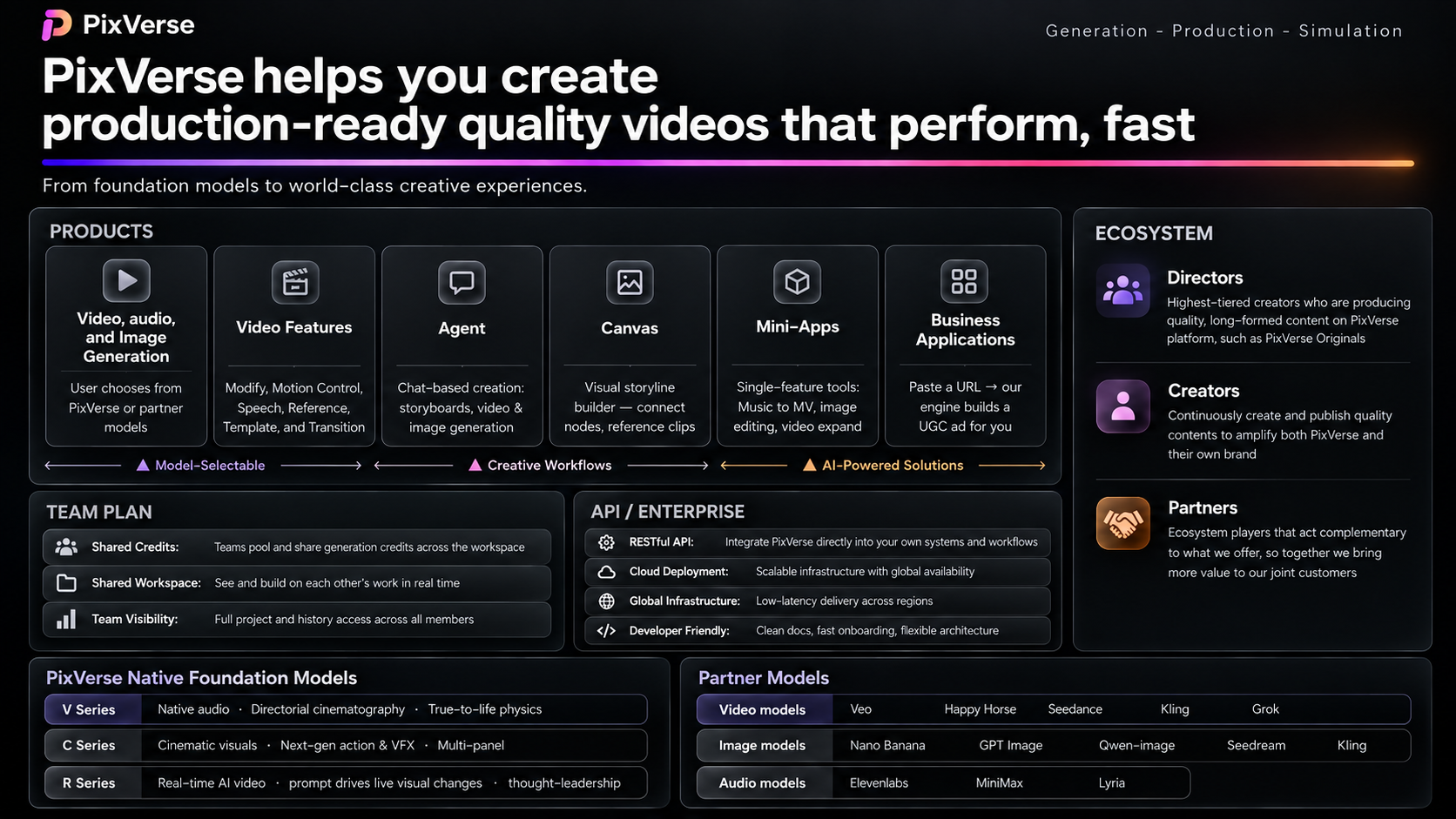
PixVerse offer map
Use this visual before product deep dives. It shows how models, creative workflows, team workspace, API infrastructure, Growth Studio, and the creator ecosystem fit together.
Customer-facing pages
Use this onboarding page to learn the routing logic. Use these public pages when a prospect needs a clean shareable link.
Use when the buyer asks about API docs, model access, endpoint coverage, pricing, concurrency, SLA, webhooks, or build-vs-buy.
Team Plan For creative teams that need shared production capacity.Use when the buyer needs seats, pooled credits, admin control, model access, Canvas, Agent, MiniApps, and team workflow.
Growth Studio For commerce teams that need repeatable ad creative.Use when the buyer has product URLs, catalog volume, creative fatigue, SKU coverage needs, and paid-social testing pressure.
What this page covers
This is not a replacement for every PDF or media example. It is the operating layer that tells sales which source to use, when to use it, and what not to promise.
Classify whether the buyer needs embedded generation, team creative production, or managed commerce ad output.
Match buyer type, company maturity, role, urgency, and budget logic before presenting product details.
Translate pain into T2V, I2V, templates, effects, Canvas, Agent, Growth Studio, API, or team workspace functionality.
Use the 20-minute call structure to surface current state, pain, impact, and a measurable next step.
Choose proof that matches the buyer and be explicit about current model strengths and limitations.
Collect environment, video_id, ai_trace_id, screenshots, logs, account context, and issue description before handing to support or product.
How to train reps
The internal training source defines a repeatable operating format: update the latest product matrix, model strengths, and limitations; then go deep on one product motion, buyer type, or use case at a time.
Send the relevant product page, use-case material, customer cases, and model-fit notes before the meeting. Ask reps to bring questions tied to live prospects.
Presenter covers target customer profile, sellable capabilities, proof points, limitations, and signed customer case studies.
Pick 1-2 reps to sell the covered motion while the trainer acts as the customer, or run prepared questions to check whether reps can route and demo correctly.
First-call router
The same company can buy more than one product line, but the first sales motion should match the active business problem.
Capability map
Use when quality, instruction following, motion, cinematic output, product fidelity, or native audio-video capability is the core proof.
Use for product integrations, creator platforms, AI tools, workflow automation, storyboard-to-video, and reference-based generation.
Use when the buyer cares about reusing footage, replacing people/products, dubbing, audio, continuation, or post-production automation.
Use for viral effects, product showcase templates, campaign variants, social content, and fast first-success experiences.
Use when users need script planning, asset selection, auto-assembly, brand/logo/end-card output, or workflow shortcuts rather than raw prompting.
Use for agencies, professional creators, brand teams, and enterprise content teams that need reusable, project-based production workflows.
Use for seats, pooled credits, role/admin control, centralized billing, concurrent generation, shared output, and usage visibility.
Use for Shopify/DTC merchants, growth marketers, ecommerce sellers, and agencies that need batch ad variants and content-performance iteration.
Qualification guide
Industry helps choose examples, but the first sales decision is simpler: is the customer embedding PixVerse into a product, scaling an internal creative team, or asking PixVerse to turn product data into performance creative?
Listen for API docs, SDK, latency, concurrency, pricing per second, SLA, private deployment, model comparison, or build-vs-buy language. The next step is a sandbox and one real integration scenario.
Listen for shared accounts, scattered assets, credit workarounds, many creators, approval loops, campaign volume, and production deadlines. The next step is a workspace trial using their own assets.
Listen for Shopify, Amazon, TikTok Shop, SKU volume, creative fatigue, rising CAC, ROAS pressure, PMax, Meta Advantage+, or weekly testing needs. The next step is a 7-day product-URL pilot.
If they want a production workspace for their team, lead Team Plan. If they want PixVerse to generate batches of ecommerce ads from client catalogs, lead Growth Studio. If they are building client software, lead API.
Lead with brand governance, security, procurement, admin control, usage visibility, pilot criteria, and stakeholder alignment. Then map the product surface to the workflow they can actually adopt.
If the buyer has no owner, no content workflow, no sample assets, no technical path, or no success metric, run discovery first. A clear next step beats a broad PixVerse feature tour.
Model API motion
API customers are making a build-vs-buy decision. They buy when time pressure, capability gap, and validation logic converge: they need video generation in-market, lack a dedicated video model team, and want proof before committing internal resources.
Give sandbox access or a free credit allocation.
Help them run one real use case end-to-end using their own scenario.
Use results to discuss SLA, concurrency, prepaid credits, annual terms, enterprise discounts, and production scale.
AI content tools, creator platforms, social media tooling, ecommerce marketing tools, AdTech, MarTech, game studios, and tech-driven media teams.
CTO or VP Engineering decides. PM champions. Developer or tech lead implements and validates docs, SDK, response speed, and error handling.
Benchmarks, real generated samples, API docs, per-second pricing, concurrency plan, uptime/SLA story, and TCO comparison versus self-hosting.
Without audio list price
Without audio list price
Without audio list price
Without audio list price
Team Plan motion
Team Plan buyers make effect judgments: see a compelling output, map it to their own campaign, calculate saved time or cost, then buy. Team Ultra adds the production controls that make PixVerse usable for teams, not just individual creators.
Find the creative bottleneck: speed, cost, headcount, brand consistency, review cycles, or iteration volume.
Demo the full PixVerse surface: models, templates, miniapps, Agent, Canvas, asset workflows, and team workspace controls.
Build the internal case with pooled credits, role/admin controls, centralized billing, 12 concurrent generations per seat, and usage visibility.
$199/seat/month or $149/seat/month annually, 25,000 credits per seat/month, up to 100 seats, 1080P, 12 concurrent generations per seat, 40% off third-party video models, unlimited image generation, and 100% free off-peak generation.
Creative agencies, brand content teams, ecommerce and FMCG teams, entertainment companies, MCNs, production teams, and enterprise content departments.
Team Plan page, model access list, workspace/admin story, Canvas as project workbench, Agent/miniapp examples, and production-cost calculator.
Growth Studio motion
As bidding and targeting become automated through PMax, Advantage+, and similar platforms, ad creative becomes the controllable performance variable. Growth Studio turns product URLs or catalog data into scalable, multilingual marketing videos, from batch production to learning and performance optimization.
Start from product URLs, Shopify catalog, Google Sheet, or manual product entries; enrich with product images, descriptions, prices, reviews, brand colors, and selling points.
Generate structured briefs, hooks, scripts, prompts, and variants across UGC, unboxing, product showcase, motion graphics, and ad-clone styles.
Review for product fidelity, brand fit, platform compliance, hook clarity, deployability, CTR/CVR/ROAS learning, and next-batch iteration.
Overseas independent ecommerce merchants, growth DTC brands, Shopify sellers, CN outbound sellers, North American local brands, and agencies serving commerce accounts.
Product URLs or catalog, target market, target placement, language, duration, ad style, brand assets, must-show benefits, review criteria, and examples of current winning or rejected creatives.
Growth Studio page, short usage video, Help Center, product catalog setup, 3 free generations, local sample videos, and a 7-day pilot plan.
Demo and POC playbook
Use one real user scenario, API docs, generated samples, response behavior, pricing estimate, and issue-escalation path. Avoid generic slide-only demos.
Use buyer assets, show templates and controllability, show Canvas/project workflow, explain credits and concurrency, then quantify one content workflow.
Use product URLs/catalog items, agree ad styles and platform specs, generate batches, review against usability criteria, and propose next market/category.
Strong areas include apparel, footwear, beauty, home decor, cinematic motion, single-presenter product explanation, templates, and product showcases. Be careful with tiny products, packaging text, jewelry/accessories, fine-grained hand actions, complex multi-person interactions, and multi-speaker lip sync.
Discovery call structure
The source methodology recommends a 20-minute flow: set agenda, understand current state, dig into pain, quantify business impact, then frame the ideal next step.
Confirm the conversation will cover current process, challenges, PixVerse fit, and next step.
Ask how videos are produced, what tools they use, how long production takes, and who is involved.
Identify whether the blocker is speed, cost, headcount, quality, control, compliance, or technical integration.
Connect the blocker to launch timelines, revenue, CAC, ROAS, creative testing, retention, or engineering opportunity cost.
Choose API POC, Team Plan trial/demo, or Growth Studio pilot with a named owner and evaluation criteria.
Objection handling
Compare total cost: production time, engineering maintenance, model quality consistency, latency, reliability, and external vendor cost.
Use their own assets or scenario in a live demo. Ask them to judge output against a real acceptance standard.
Validate the concern. Route to enterprise trust material, security review, technical stakeholder discussion, or private deployment conversation when relevant.
Find the constraint: model access, controllability, team workflow, output volume, speed, cost per usable asset, or platform limitation.
Map hidden costs: infrastructure, model maintenance, quality tuning, engineering time, procurement, launch delay, and support burden.
Bring it back to ROI. Ask what cost reduction, output increase, or launch acceleration would make the project worth prioritizing.
Support handoff
Most API or output-quality issues cannot be diagnosed from a screenshot alone. Sales should gather the minimum viable debugging packet before handing to CSM, product, or model teams.
Environment, customer account, endpoint, request time, error code, ai_trace_id, logs, and exact reproduction steps.
Environment, video_id or ai_trace_id, source materials, prompt, expected result, actual problem, and whether the issue is quality, safety review, billing, or export.
Environment, video_id or ai_trace_id, customer test account, rejection message, content context, and whether the case is normal policy or whitelist discussion.
New API customers can usually fix duration at 5; prompt can be optional; B2B effect availability follows the published effect list and weekly release rhythm.
Works best when the mouth is clear and large in frame. If audio is longer than video, output may use reverse playback alignment. Strict frame-length needs require post-processing.
360p, 540p, 720p, and 1080p map to specific long-edge rules across 16:9, 1:1, 9:16, 3:4, 4:3, and other ratios. Use FAQ before promising exact export dimensions.
Embedded source library
Use these cards as the public-ready working library. The core sales content no longer depends on opening private documents.
These are the public links a sales rep can safely share or use during a customer conversation.